

Mystery Meat Navigation: Big Corporations and/or Classic Examples
Here are some classic examples of Mystery Meat Navigation (MMN) and some from large corporations that were pulled from the pages of Web Pages That Suck:
Royal Institute for Deaf and Blind Children

Submitter's comments: Here's a Mystery Meat Navigation candidate: This is a web site for the Deaf and Blind Children.
Vincent Flanders' comments: Uh...you're using Mystery Meat Navigation on a site for the blind? Interestingly, the site seems "readable" using a using the IBM Home Page Reader (I gave it a cursory review). However, this site fails HTML validation like I failed Biology in college.
The site is gone, but I've put up a video so you can see this site in all its stupidity.
Royal Institute for Deaf and Blind Children (Video)
The Royal Institute for Deaf and Blind Children (Current Site)
Pearl Brite

Submitter's comments: I can't believe people are still doing this…will the bad designers never learn?!
Vincent Flanders' comments: Actually, it might be bad clients. What's interesting is there's actually a lot of real text that could be indexed and Google has improved their ability to index Flash text.
Still, Mystery Meat Navigation should never be used.
Other comments #1: Not sure what those balls have to do with teeth. Couple that with that suggestive menu animation on the support pages, and I'm disinclined to let these people put anything in my mouth.
Other comments #2: It has all my favorites. Faded text, random position pagelinks, vertical scrolling columns in IFrames, Involuntary background music that never quits, slow to open, and 59% of every page is wasted. What a hard to read slow loading piece of crap.
Other comments #3: That truly is a fine sucker. An excellent example of mystery meat, and to boot a seriously irritating backing track, and although you can turn that off you can't turn off the stupid fly-zapping sizzling sounds when the balls meet. It really is quite appalling and unusable. On the plus side, the moving balls can put you into a Zen trance if you watch them for too long....
Sabletine Fine Pastries

Submitter's comments: I like what they have and am still going to go in and check them out for a snack, but their website needs help.
First, the Mystery Meat Navigation, a definition is a problem. I HATE having to click through a site to “see where I’m going to end up” because no one thought to label any of the links.
Their Contact page has everything BUT any way to contact them electronically/via email (which only makes an business with a web presence look Mickey Mouse and unprofessional).
Vincent Flanders' comments: The "navigation" on the subpages consists of clicking on the "Back" link or on the logo. Not every effective. Also, if you have your monitor set in portrait mode, the lunch menu is down toward the bottom of the page. The menu is an unmarked PDF file.
MOMA Worksphere

I attended this exhibition...and found some of the displays intriguing. When I got back to the office, I wanted to point some of my colleagues to some of the more interesting displays, so I checked out the MOMA web site. First, it appears to be unavailable to anyone without Flash, and then if you get in it's MMN all the way. Let's say I suggest that my colleagues check out the Stitz Stool, the Personal Harbor, and the Aeron Chair. Where are they?
Vincent Flanders' comments: There's an old saying that there are no atheists in foxholes. I think there are no atheists when you surf and end up at sites like this. When I saw the navigation I immediately launched into a long-forgotten prayer, "Holy Mary, Mother of God, pray for these sinners now and at the hour of their deaths Amen."
No small accomplishment from someone who attended Catholic grade school back in the 1950's and still bears the psychic scars from the nuns of St. Andrew's. Here was the email that accompanied the suggestion.
As the email states, you need Flash. Fine. But when you enter you will find the most amazing and disturbing use of Mystery Meat Navigation I have ever seen (until this Wednesday, the way my luck is going).
It's bad enough that there are over 150 MMN icons, but if you click on one of the topics on the right — like "objects" — well, you'll just have to click and see for yourself.
Well, I just got the following email:
I just started working for the Museum of Modern Art and upon reviewing traffic reports from our web site I learned that we were the Daily Sucker in April. Unfortunately, that was before I started working here; however, I would be really interested in reading your review and why we sucked as we are about to redesign our web site. Can you please send me a copy of the article or a link to the archives where I might find the article?
Some things, I would think, are obvious. That's why this site is the current Mystery Meat Navigation champ.
MOMA Worksphere (Video—the site's long gone)
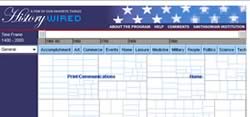
HistoryWired at Smithsonian Institute

Vincent Flanders' comments: I don't know what to think about this one.
The (small) part of me that's visually oriented wants to like it and the (major) part of me that's word-oriented wants to hate it. I'll give you the email I received.
This site pains me. It truly pains me. The Smithsonian is such a great learning center. One of the reasons I love having moved to this area is that I can visit the many Smithsonian museums any time I like. I just looked a this and thought "What were they THINKING!"
Here, we have MMN taken to a new level. A screen of blank, various-sized boxes that give no clue as to what lies beneath. Then you start to roll-over the boxes with you curser. By the way, that microscopic dot is your curser. Suddenly lines spring from the toolbar boxes and a large orange rectangle gives a few lines describing the picture you see that has popped up on the left. That is unless the box is on the far right or the bottom of the screen, then the picture has moved off the edge of your screen and you'll have to scroll back to see it. Click in one of the boxes. See the offer to zoom in at 2x, 4x, or 8x? You think that applies to the picture, don't you? Oh no! It zooms in on the box. On to the one-line title in the box. I didn't know whether to laugh or cry. By the way, the size of the box doesn't seem to have any relation to anything. I'm not sure why they have all those different sizes.
When you first enter the site there is a pop-up window that explains how to navigate the site, but it's really a lost cause from the start. Trust me, just come to D.C. and hang around the museums for a few days.
Like I said, most of me doesn't like it. On the other hand, there's a part of me that admires the difficulty in creating something like this.
Color, Contrast & Dimension in News Design

Yeah, great document TITLE -- "Untitled". They have to use Flash — and they use it nicely — but if you don't have Flash, you get a blank page. They could at least provide an explanation of what the page is about and a link to get Flash.
Real graphic designers don't use "Mystery Meat Navigation" — it's only used by ArtFarts — unless the site is personal, experimental, music, game, theatre, or sites where the goal is to be cool rather than informative.
Seems like I ran a Google search on "Untitled" and it came up with something like 13,600,000 pages. Ooops. Oh, it's really bad form to say "something like" or "sort of." Why? If you're a heterosexual male, ask yourself this question, "Would you want to date someone who was 'something like' a woman?" Another grammar issue that drives me crazy is "very unique." You can only be "unique" — "Radically distinctive and without equal" in my dictionary — which precludes the use of "very."
One of the best uses of Flash on the Web comes from the BBC and their "Spot the fake smile." You'll never look at a smile the same way again. I gave this little test to my friends and — surprise! surprise! — women scored better at finding the fake smile than men. It would be interesting to see how well professional poker players score on this test. I would hope they get them all correct. My score? 12 out of 20 correct. That's why I don't play poker for money (plus I can't bluff).
The original URL for Color, Contrast & Dimension in News Design (poynterextra.org/cp/colorproject/color.html) doesn't work.
Next: usic, Movie and Art Mystery Meat
Back to Mystery Meat Intro
Recent Examples of Mystery Meat Navigation
Big Corporations or Classic Examples of Mystery
Meat
Music, Movie and Art Mystery Meat
Web Designer Mystery Meat
Coda